Blog
Best Internet Provider for Working From Home in 2026

Updated on September 19, 2026
7 min read

Use the FCC Broadband Availability Map to see which providers are available at your address before choosing the best internet provider for working from home.
Working from home isn’t just about fast downloads.
Video calls eat upload bandwidth. Large file transfers need consistency. Outages cost you money.
Here’s how to find the best internet provider for your remote work setup — without overpaying.
Renting or moving often? Remote workers who rent should see our companion guide to the best internet for renters who move frequently — no-contract and portable options that follow you between apartments.
Remote work tip: compare T-Mobile Fiber and 5G Home Internet plans — symmetrical fiber speeds keep video calls smooth for multiple people.
What Remote Workers Actually Need From Their Internet

Before picking a provider, know what you’re using:
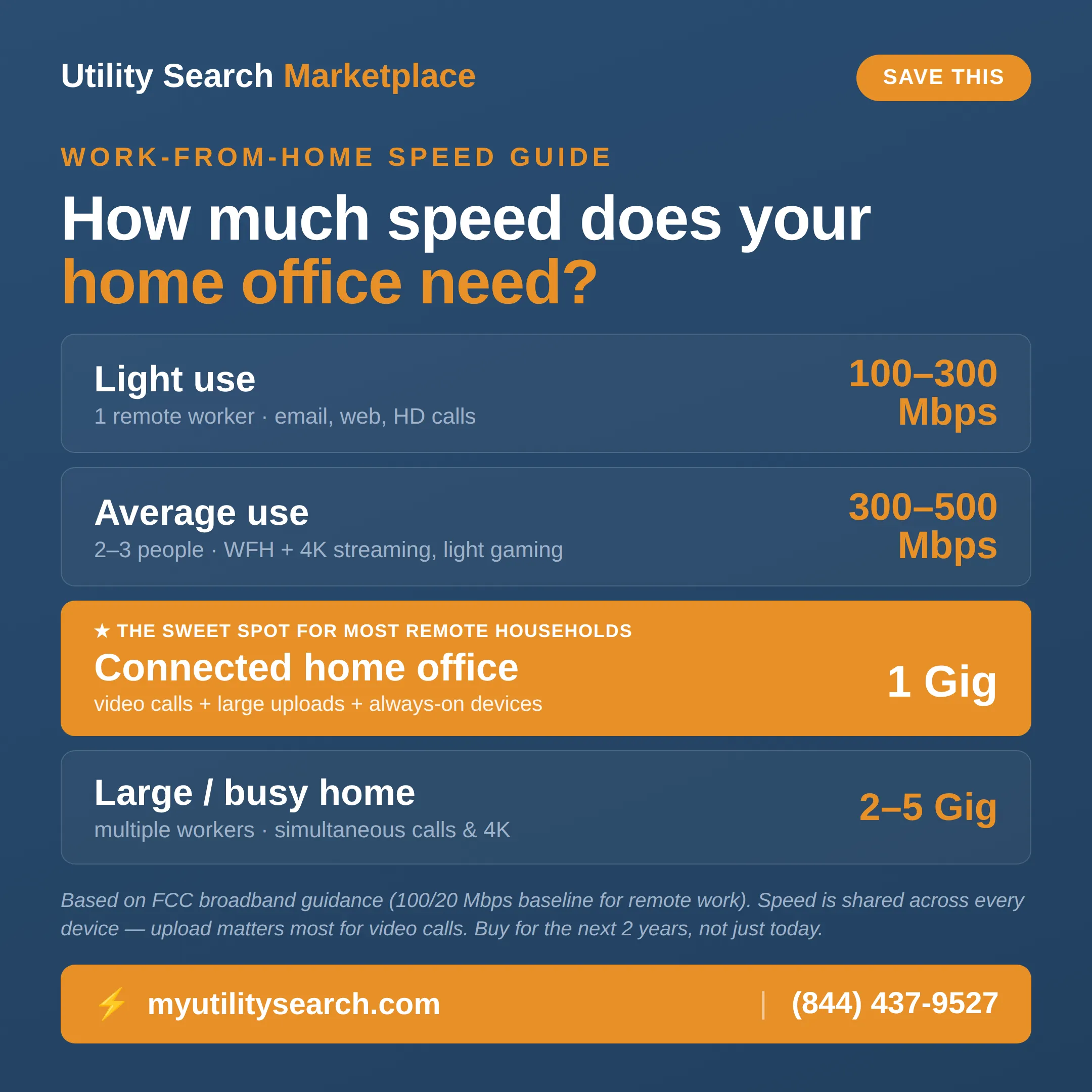
- Video calls (Zoom, Teams, Meet): Minimum 5 Mbps upload per person on a call. 10+ Mbps recommended.
- Large file uploads/downloads: 25+ Mbps upload for fast transfers to cloud storage or client servers
- Multiple devices: Add 5–10 Mbps for each additional person or device using the connection simultaneously
- VPN usage: VPNs reduce speed by 10–30% — factor that into your plan choice
Bottom line: if you’re the only remote worker at home, 100 Mbps down / 20 Mbps up is comfortable. 300+ Mbps is ideal.
Best Internet Providers for Remote Work in 2026
| Provider | Type | Starting price | Speed range | Upload | Best for |
|---|---|---|---|---|---|
| AT&T Fiber | Fiber | ~$55/mo | 300 Mbps–5 Gig | Symmetrical | Best overall — video-heavy work, large uploads |
| Verizon Fios | Fiber | $49.99/mo | 300 Mbps+ | Symmetrical | Reliability (East Coast) |
| Google Fiber | Fiber | $70/mo | 1 Gig | Symmetrical | Speed-to-price (~30 cities) |
| Xfinity | Cable | $30–$50/mo | 75 Mbps–1.2 Gbps | Slower than fiber | Best availability when fiber isn’t offered |
| T-Mobile Home Internet | 5G | $50/mo flat | 100–300 Mbps | Inconsistent | Rural / flexible / backup line |
1. AT&T Fiber — Best Overall for Remote Workers
AT&T Fiber offers symmetrical speeds — meaning your upload and download speeds are equal.
That’s a game-changer for remote workers. Most cable internet plans have slow upload speeds.
Plans start at 300 Mbps for around $55/month and go up to 5 Gig.
Low latency and consistent reliability make it the #1 choice if it’s available in your area.
Best for: Video-heavy remote workers, developers, designers who upload large files
2. Verizon Fios — Best for Reliability
Verizon Fios consistently ranks #1 or #2 for reliability and customer satisfaction.
Like AT&T Fiber, it’s a true fiber connection — symmetrical speeds, low latency.
Plans start at 300 Mbps / $49.99/month.
Only available on the East Coast, but if you’re in their coverage area, it’s excellent.
Best for: East Coast remote workers who value consistent uptime
3. Google Fiber — Best Speed-to-Price Ratio
Google Fiber offers 1 Gig service starting at just $70/month in select cities.
No data caps. No contracts. Symmetrical speeds.
The catch: availability is limited to about 30 cities.
Best for: Remote workers in Google Fiber cities who want the most bandwidth for their money
4. Xfinity — Best Availability for Remote Workers
Xfinity (Comcast) is available in more areas than almost any other provider.
Their cable internet is fast (up to 1.2 Gbps in most areas) — but upload speeds are slower than fiber.
Plans start around $30–$50/month for 75–300 Mbps.
If fiber isn’t available, Xfinity is the next best option for most remote workers.
Best for: Remote workers where fiber isn’t available
5. T-Mobile Home Internet — Best for Flexibility
T-Mobile Home Internet uses their 5G/4G LTE network. No contracts. $50/month flat.
Speeds typically range from 100–300 Mbps down, but upload speeds and latency can be inconsistent.
Not ideal for heavy video calling or VPN use — but great as a backup or if wired options are limited.
Best for: Rural remote workers or those who need flexibility without a long-term contract
Fiber vs Cable vs 5G Home Internet for Remote Work
- Fiber: Best overall — symmetrical speeds, lowest latency, most reliable. First choice for remote work when available.
- Cable (Xfinity, Spectrum): Fast downloads, slower uploads. Fine for most remote workers, less ideal for heavy video/upload work.
- 5G Home Internet (T-Mobile, Verizon): Convenient and flexible. Speeds vary. Best as a backup or in areas with no wired competition.
- DSL: Avoid if possible. Too slow for modern remote work demands.
How to Choose the Best Provider for Your Remote Work Setup
Step 1: Check what providers are available at your address. Availability varies block by block.
Step 2: Prioritize upload speed. Most internet ads focus on downloads — but remote work runs on uploads.
Step 3: Look for no data caps. Video calls and cloud backups use a lot of data.
Step 4: Consider whether you need a backup connection (like a T-Mobile hotspot) for outage coverage.
Step 5: Compare prices at your needed speed tier — don’t pay for 1 Gig if you only need 300 Mbps.
Pros and Cons by Provider for Remote Work
Here’s the quick trade-off view for the top work-from-home providers — two pros and two cons each, so you can match a provider to how you actually work.
| Provider | Pros (for WFH) | Cons (for WFH) |
|---|---|---|
| AT&T Fiber | Symmetrical speed; no annual contract | Fiber footprint is limited by ZIP |
| Verizon Fios | Rock-solid for video calls; no contract | Northeast-weighted availability |
| Xfinity | Widely available; fast downloads | Slower uploads; data caps in many areas |
| T-Mobile 5G Home | No contract; quick self-install | Latency/speed vary with tower load |
Our pick: AT&T Fiber if available, then Verizon Fios or Google Fiber, then Xfinity (best cable), then T-Mobile 5G Home (best no-wire). Before you sign up, compare 1 Gig internet plans and check the fine print on data caps and overage fees. Rural or fiber-less address? See whether Starlink is worth it for remote work.
Best internet for remote work plus gaming or streaming
If you game or stream 4K while working, size for the combined load: choose fiber for its low ping, aim for 300 Mbps or more, and pick a plan with no data cap so heavy days don’t throttle you.
Compare internet, energy & home security at your address
Frequently Asked Questions
What internet speed do I need to work from home?
For one person working from home with video calls, 100 Mbps down and 10–20 Mbps up is the comfortable minimum. If multiple people share the connection or you regularly transfer large files, aim for 300 Mbps or more.
Is fiber internet worth it for remote work?
Yes — fiber’s symmetrical upload and download speeds make it the gold standard for remote work. If AT&T Fiber, Verizon Fios, or Google Fiber are available at your address, they’re almost always the best internet provider for working from home.
Is 5G home internet good enough for working from home?
It depends. T-Mobile and Verizon 5G home internet can deliver 100–400 Mbps in good-signal areas, but speeds can drop during peak hours. Fine for light remote work; fiber or cable is more reliable for heavy video calling or large file work.
Which internet provider has the best upload speed?
Fiber providers — AT&T Fiber, Verizon Fios, and Google Fiber — offer the best upload speeds because they’re symmetrical. Cable providers like Xfinity typically have much slower upload than download.
Does internet provider matter for Zoom calls?
Yes, significantly. Zoom needs consistent upload bandwidth and low latency. Fiber is most consistent; cable can work well but is more prone to packet loss during peak neighborhood usage.
Sources
- FCC National Broadband Map — provider availability by address.
- Provider plan pricing/speed: AT&T, Verizon Fios, Google Fiber, Xfinity, and T-Mobile published rate cards (2026).
Find the Best Internet Plan for Remote Work
Check availability and compare internet providers at your address at Utility Search Marketplace. See speeds, prices, and contract terms side-by-side — free. Prefer to talk it through? Talk to a utility specialist — consultations are free.
Related guides:
- Starlink vs T-Mobile Home Internet 2026
- How to Lower Your Internet Bill Without Canceling
- Best Internet Providers in 2026: Full Comparison
Best Internet Provider for Working From Home: Our Top Picks
The best internet provider for working from home in 2026 depends on what’s available in your ZIP code. If AT&T Fiber is in your area, it’s consistently the best internet provider for working from home — 300-1000 Mbps symmetrical speeds mean uploads are just as fast as downloads, which matters enormously for video calls and cloud file transfers. If fiber isn’t available, Xfinity’s cable service is often the best internet provider for working from home in suburban areas, with reliable 300-800 Mbps packages. For rural remote workers, T-Mobile 5G Home Internet is frequently the best internet provider for working from home where traditional broadband options are limited. Use the FCC Broadband Map or our comparison tool to check which best internet provider for working from home options are actually available at your address.
Ready to Start Saving on Utilities?
Compare energy rates and internet plans side by side — free, in minutes.
Choose your situation
Not sure which guide fits? Jump to the one that matches how you work — or compare every provider in one place:
- Most reliable internet for remote work — for dropped calls and outages.
- Best internet for video conferencing — if you live on Zoom, Teams, or Meet.
- Compare the best internet providers for 2026
- Best internet for streaming
- How to find the best internet provider in your area
- Find the best internet for your area
- How to lower your internet bill