Blog
Business Internet Backup: Proven $30 Plans That Keep You Open, and the Costly Fine Print

Updated on October 28, 2026
9 min read
Last updated October 22, 2026 · Prices below were read from each provider’s own pages and documents. Backup plans change often, so check the fine print at your address before you buy.
Business internet backup is a second connection that takes over when your main line drops, so card payments, phones and cloud apps keep working. In October 2026, cellular backup starts at $30 a month with AT&T, and a full T-Mobile 5G Business Internet line runs $35. The catch: most backup plans slow down after a data cap, and none of them work in a power outage without a battery.
TL;DR: business internet backup, October 2026
- Built in free: AT&T includes 5G backup with its 1 Gig and faster business fiber plans.
- Cheapest backup plan: AT&T Business Wireless Backup Advanced, $30 a month, automatic failover, slowed to 3 Mbps after 30GB.
- Full second line: T-Mobile 5G Business Internet, $35 a month with any T-Mobile voice line and a 5-year price guarantee, a whole 5G line you can run as your second connection.
- Rural option: Starlink Business from $55 a month plus $349 hardware, for sites with weak cell signal.
- The rule that matters: your backup must use a different path than your main line. A second cable line on the same pole fails with the first.
- Don’t forget power: a backup modem without a battery goes dark in the same storm that took your internet down.
What is business internet backup?
Business internet backup is a secondary internet connection, usually cellular, fixed wireless or satellite, that a router switches to automatically when the primary connection fails. When the main line comes back, traffic switches back on its own.
Definition: failover
Failover is the automatic switch from a failed connection to a backup one. A failover router watches the main line and moves traffic to the backup within seconds, so most staff never notice. “Diverse” backup means the second connection shares no wires, poles or equipment with the first.
The point is not speed. A good business internet backup only has to carry the things that cannot stop: card readers, phones, the point-of-sale system and the few cloud apps your team needs to keep serving customers.
How much does business internet backup cost in 2026?
Business internet backup plans from the big carriers cost $30 to $35 a month for cellular service, before equipment and fees. These are the published terms:
| Backup plan | Type | Monthly price | Data | Fine print |
|---|---|---|---|---|
| AT&T Business Fiber (1 Gig+) | Built-in 5G backup | Included | Backup gateway included | Not in a power outage; static IPs and AT&T VoIP do not fail over |
| T-Mobile 5G Business Internet | 5G cellular (full line) | $35 with any T-Mobile voice line | Unlimited; Wi-Fi 7 gateway included | 5-year price guarantee; full business line, not a backup-only plan; speeds vary on the cellular network |
| AT&T Business Wireless Backup Advanced | 4G/5G fixed wireless | $30 | Unlimited; slowed to 3 Mbps after 30GB | Up to $50 activation; battery sold separately; may end after 7 days of continuous use |
| Starlink Business | Satellite | From $55 | Data in 50GB or 500GB blocks | $349 hardware; works where cell signal is weak |
Sources: AT&T Business Wireless Backup Advanced 2.0 brief (2026); AT&T Business Fiber page (read Oct 16, 2026); T-Mobile 5G Business Internet page (read Oct 22, 2026); Starlink Business page (read Oct 22, 2026). Taxes, fees and equipment extra unless stated. Verizon and Comcast sell business backup by quote at your address.
Which business internet backup is best?
The best business internet backup is the one that fails differently from your main line. Match the backup to the primary:
- Cable or fiber primary, good cell signal: a 5G or LTE backup from a different company than your main provider. This is the most common small-business setup and the cheapest.
- AT&T Business Fiber primary: AT&T builds 5G backup into its 1 Gig and faster business fiber plans, as our business fiber internet comparison notes. It does not work in a power outage, and static IPs and AT&T VoIP do not fail over to it.
- Weak cell signal or rural site: Starlink or fixed wireless, which share nothing with the local wires.
- Revenue stops the minute you go offline: a second wired connection from a different provider on a different path, or dedicated internet access with an SLA plus a cellular backup.
Avoid buying backup from the same company as your main line when you can. A provider-wide outage can take both down, and a backup that rides the same cable defeats the purpose.
Compare internet, energy & home security at your address
How does business internet backup failover work?
There are two common setups. Either one can be live in a day if the signal is good:
- A failover router. Your main connection and the backup modem both plug into one router with two internet ports. It checks the main line every few seconds and switches when it stops responding.
- A provider gateway with backup built in. Some providers put the cellular radio inside the gateway, so the switch happens inside one box. It is simpler, but you are tied to that provider for both lines.
AT&T’s Business Wireless Backup Advanced, for example, offers automatic failover or manual activation and works with your own compatible router or one bought from AT&T. Test the switch before you need it: unplug the main line during a slow hour and confirm that card payments and phones still work.
The fine print that trips up backup buyers
Business internet backup plans are cheap because they are built for short outages. Read for these limits:
- Data caps and slowdowns. AT&T’s backup plan slows to a maximum of 3 Mbps after 30GB in a bill cycle.
- Time limits. AT&T says that after seven days of continuous use it may move you to a full Internet Air for Business plan or end the service. A backup is not a cheap primary line.
- Power. AT&T sells battery backup separately; without it, the service does not work in a power outage. Put the modem, router and phones on a battery (UPS).
- Static IPs and phones. If your phone system or a remote-access tool depends on a static IP, check whether it carries over to the backup. Often it does not.
- Fees. AT&T lists an activation fee of up to $50 per line and monthly per-line fees on top of the $30 price.
Does a backup keep your phones working?
Yes, if your phones are cloud VoIP and the backup has enough upload. A VoIP call needs only about 100 Kbps each way, so even a slowed backup can carry several calls. Cloud phone apps on staff cell phones keep working even if the office is completely offline. Our business phone service guide compares the plans.
The exceptions are lines that need a physical connection: alarm panels, elevator phones and fax lines. Those need their own replacement plan when copper retires; see our guide to the AT&T copper line shutdown.
Is business internet backup worth it?
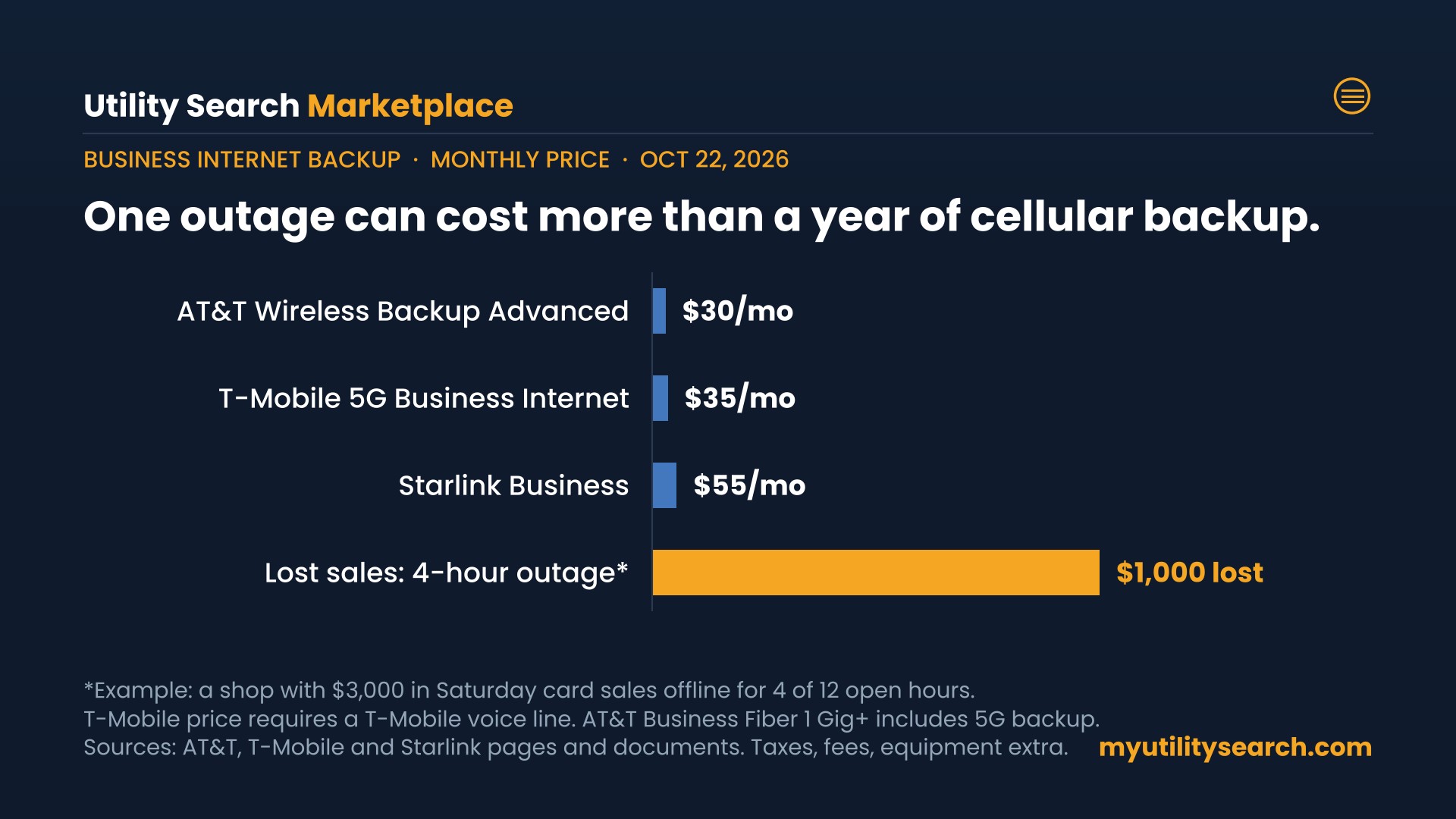
Do the math with one outage. If your shop does $3,000 in card sales on a Saturday and goes offline for four hours, that can be $1,000 or more in lost or delayed sales. A $30 to $35 business internet backup costs $360 to $420 a year. For most businesses that take payments, book appointments or run phones over the internet, one long outage covers the cost.
It is less essential for a home office with a phone hotspot, or a business that can work offline for a few hours without losing sales.
What owners like and dislike about business internet backup
What owners like: the switch is invisible when it works, card readers keep running during a cable cut, and the monthly cost is less than one lunch for the team.
What frustrates them: discovering the limits during an outage, such as a data cap that slows the connection, a modem that died with the power, or a static IP that did not carry over. The fix is testing the backup on a quiet day, not on the day you need it.
How to set up business internet backup in 5 steps
- List what must stay online: payments, phones, scheduling, and the cloud apps that keep you serving customers.
- Check cell signal inside your building for at least two carriers, and pick one different from your main provider.
- Choose the hardware: a failover router with two internet ports, or a provider gateway with backup built in.
- Add battery power for the modem, router and phones.
- Test it: unplug the main line for 15 minutes and run a card payment and a phone call.
Frequently asked questions
How much does business internet backup cost?
In October 2026, cellular business internet backup costs about $30 to $35 a month: AT&T charges $30 for Business Wireless Backup Advanced and T-Mobile $35 for a 5G Business Internet line, plus equipment and fees.
What is the best backup internet for a small business?
A 5G or LTE backup from a different carrier than your main line, connected through a failover router, is the best fit for most small businesses. Rural sites with weak cell signal do better with Starlink or fixed wireless.
Does backup internet work in a power outage?
Only with battery power. AT&T says its business backup does not work in a power outage without a separately purchased battery. Put the modem, router and phones on a UPS.
Can I use backup internet as my main connection?
No. Backup plans are built for short outages. AT&T, for example, slows its backup after 30GB a month and may end service after seven days of continuous use.
Do I need a special router for internet failover?
You need a router that can switch between two internet connections, or a provider gateway with backup built in. Most business-grade routers support failover.
Bottom line on business internet backup
Business internet backup is the cheapest insurance in your utility stack: about $30 to $35 a month for a cellular line that keeps payments and phones running. Pick a carrier different from your main provider, put the equipment on a battery, and test the switch before you need it.
Compare internet, energy & home security at your address
Sources
- AT&T Business Wireless Backup Advanced 2.0 brief (2026)
- AT&T Business Fiber plans (read Oct 16, 2026)
- T-Mobile 5G Business Internet (read Oct 22, 2026)
- Starlink Business (read Oct 22, 2026)
Talk to a business internet specialist
For quotes on business fiber, backup connections, phones and IT at your location, call (866) 328-7973 or use BOX by TechGuidance to pull every serviceable connection for your address.
Are you a residential customer?
Shopping for home internet instead? Compare home internet plans at your address or call our residential team at (844) 437-9527.
Keep going
- Business internet providers compared: fiber, cable and fixed wireless
- Business fiber internet prices compared
- Dedicated internet access: what the SLA buys
- Business phone service prices and the billing trap
- AT&T copper line shutdown: what businesses replace them with
- Starlink internet plans and prices