





Blog
Starlink Internet Plans & Prices 2026: Every Tier, Kit and Fee (vs Amazon Leo)

Updated on October 1, 2026
16 min read
Starlink internet plans and prices in 2026 come down to three residential tiers — Residential 100 ($55/mo), Residential 200 ($85/mo) and Residential MAX ($130/mo) — plus Roam plans at $55, $80 and $175 for travel, a $349 standard kit (often free on a rental promo) and a $199 Mini. All Starlink internet plans are unlimited, contract-free and self-installed, and the price you see at checkout depends on your address and local network demand. Here are all the Starlink internet plans at a glance, verified against starlink.com on 6 September 2026:
| Starlink plan (2026) | Speed | Monthly price | Hardware | Best for |
|---|---|---|---|---|
| Residential 100 | Up to 100 Mbps | $55/mo | $349 standard kit or free rental (select areas) | Light households, budget rural |
| Residential 200 | Up to 200 Mbps | $85/mo | $349 standard kit or free rental (select areas) | Streaming households, remote work |
| Residential MAX | Up to 400 Mbps, priority data | $130/mo | $349 standard kit | Large households, gaming, congested cells |
| Roam 100 GB | Up to 260 Mbps | $55/mo | $199 Mini or $349 standard | Occasional RV and camping use |
| Roam 300 GB | Up to 260 Mbps | $80/mo | $199 Mini or $349 standard | Seasonal travel |
| Roam Unlimited | Up to 260 Mbps | $175/mo | $199 Mini or $349 standard | Full-time RV, in-motion use |
Residential 100 and 200 are sold only in regions with spare capacity; high-demand cells may show a one-time congestion charge of $100 or more. A 30-day money-back trial applies to all Starlink internet plans.
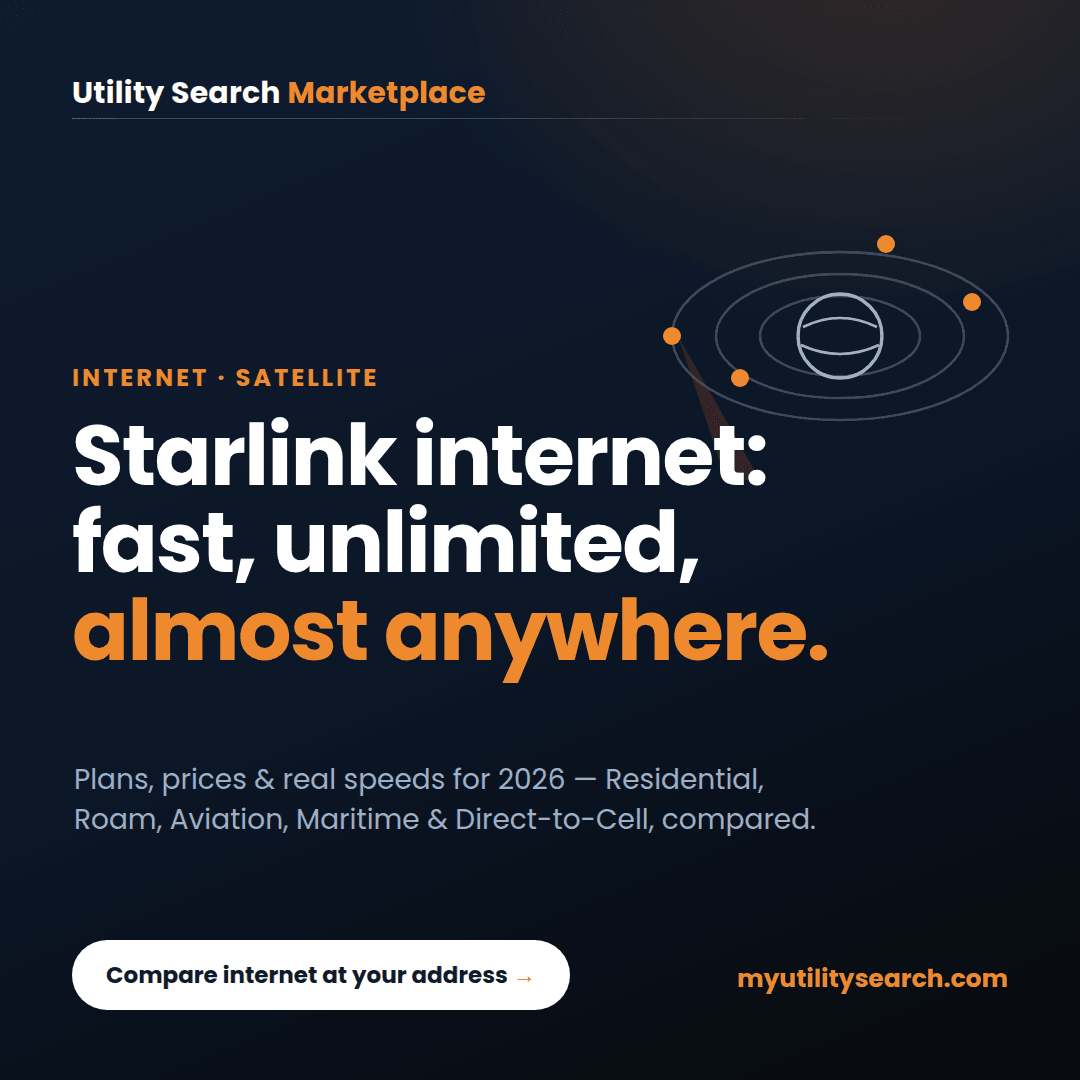
Starlink internet is SpaceX’s satellite-broadband service, and its edge over old-style satellite is thousands of low-Earth-orbit (LEO) satellites that cut latency to roughly 25–60 ms — fast enough for video calls, streaming, and most gaming, with unlimited data and no contract. In 2026, Starlink has grown well beyond the home dish: there are now Residential, Roam (mobile/RV), Business, Aviation, Maritime, and Direct-to-Cell products, and pricing varies by your exact address and network demand. This guide covers every plan, current prices, real-world speeds, and how to tell whether Starlink is the right call at your address.
If you’re weighing Starlink against wired options, our guide to cable internet alternatives compares fiber, 5G home internet, and satellite head-to-head.
TL;DR — Starlink internet plans, key takeaways – Starlink internet uses LEO satellites, so latency (~25–60 ms) is far lower than HughesNet or Viasat (~600 ms). – Residential runs about $55–$130/month with unlimited data and no contract; the Standard Kit is ~$349 (often discounted). – Roam (RV/travel) starts around $50/month; Business/Priority, Aviation, and Maritime scale up from there. – Direct-to-Cell (T-Mobile T-Satellite) now adds satellite texting to an ordinary phone for about $10/month. – Prices now vary by address and congestion — always confirm the current price for your location before you order. – Starlink internet is usually the best option where fiber, cable, and 5G don’t reach; wired plans are typically faster and cheaper where they exist.
Best for most rural homes: Residential 200 at $85/mo if two or more people stream and work at the same time, or Residential 100 at $55/mo for one or two light users. Skip Starlink if fiber, cable or 5G home internet reaches your address: they are cheaper for the speed, and Starlink’s checkout price can run higher than the list price in congested areas. Check what is available at your address before you order the kit.
What is Starlink internet?
Definition — Starlink internet: the satellite-internet service from SpaceX that delivers broadband using a large constellation of low-Earth-orbit (LEO) satellites and a self-installed dish (“Dishy”) plus Wi-Fi router. Because the satellites orbit far closer to Earth than traditional geostationary satellites, latency drops from ~600 ms to roughly 25–60 ms.
Unlike older providers that rely on a few distant satellites parked ~22,000 miles up, Starlink internet uses thousands of satellites only a few hundred miles overhead. That proximity is the whole story: it’s what makes Starlink usable for Zoom calls, cloud apps, and online games that legacy satellite simply couldn’t handle. You get a self-install kit, unlimited data, and no long-term contract — which is why Starlink has become the go-to option for rural and hard-to-serve addresses across the U.S.
Starlink internet plans and prices (2026): every tier explained
Starlink internet plans changed more in 2025–2026 than in the previous four years combined: the single $120 Residential plan became three speed tiers, hardware dropped to $349 with free-rental promos in low-demand areas, and the Mini opened a $199 entry point. The table below is the full 2026 lineup.
Pricing and availability vary by address and network demand, so confirm the current price for your exact location before you order. As of 2026, residential Starlink internet plans are sold in speed-based tiers rather than one flat national rate:
| Plan | Typical speed | Data | Price* |
|---|---|---|---|
| Residential — 100 Mbps | Up to 100 Mbps | Unlimited (deprioritized) | ~$55/mo |
| Residential — 200 Mbps | Up to 200 Mbps | Unlimited (deprioritized) | ~$85/mo |
| Residential — Max | Top available speed + priority | Unlimited (priority) | ~$130/mo |
*Prices vary by address and congestion; confirm at starlink.com before ordering.
Real-world downloads typically run about 80–100 Mbps on the 100 tier, 140–200 Mbps on the 200 tier, and 170–320 Mbps on Max, at 30–40 ms latency — with no monthly provider fees, no contract, and no early-termination fee. For hardware, the Standard Kit is about $349 (regional discounts up to ~$200 off appear in some areas), or you can rent it; professional installation is an optional ~$99, and a one-time demand surcharge can apply in congested regions. This is the core of Starlink internet for most households.
Compare internet, energy & home security at your address
Shop InternetShop Energy RatesShop Home SecurityStarlink internet plans for Roam: mobile, RV, and travel
Roam is the version of Starlink internet built for people who move. It supports in-motion use (with the Flat High Performance dish), works across a wide coverage footprint, and lets you pause and resume billing any month with Standby Mode — ideal for RVs, vans, campers, and remote cabins rather than a fixed home.
| Roam plan | High-speed data | Best for | Price* |
|---|---|---|---|
| Roam — 50 GB | 50 GB, then slower | Occasional/weekend travel | ~$50/mo |
| Roam — Unlimited (Regional) | Unlimited in home region | Full-time RV / nomad | ~$165/mo |
| Global roaming add-on | Coverage in 70+ countries | International travel | Higher tier |
*Roam pricing and data caps change frequently; confirm current terms at starlink.com.
Two hardware notes matter for mobile Starlink internet. First, the compact Starlink Mini — a backpack-sized dish with a built-in router — has come down in price to roughly $199 in the U.S. and is the easiest way to take Starlink camping or overlanding. Second, true in-motion use (streaming while the vehicle is actually moving) requires the Flat High Performance dish, not the standard or Mini dish. Expect Roam speeds to run lower and more variable than Residential because mobile traffic is deprioritized.
Starlink internet plans for business: Business and Priority
For offices, job sites, and heavy users, Business (Priority) plans give Starlink internet a guaranteed monthly allotment of priority data that isn’t slowed during peak hours, plus higher upload performance and a service-level commitment.
| Priority data | Local Priority | Global Priority |
|---|---|---|
| 50 GB | ~$55/mo | ~$250/mo |
| 500 GB | ~$155/mo | ~$650/mo |
| 1 TB | ~$280/mo | ~$1,150/mo |
| 2 TB | ~$530/mo | ~$2,150/mo |
Local Priority Starlink internet delivers roughly 100–280 Mbps down / 10–30 Mbps up. After the priority allotment is used, service continues at up to 1 Mbps down / 0.5 Mbps up, and you can add data blocks (+50 GB for ~$25, +500 GB for ~$125) from your account. No contract, 30-day trial, no early-termination fee.
Starlink Aviation: in-flight Wi-Fi
Aviation is Starlink internet in the sky — the same LEO network delivering low-latency Wi-Fi to aircraft, from single-engine general-aviation planes to wide-body airliners. This is one of the fastest-growing arms of Starlink, and it changed sharply in 2026.
What it costs (2026). After earlier promotional rates, Starlink raised Aviation pricing in 2026, drawing complaints from general-aviation pilots. Current tiers look roughly like this:
| Aviation tier | Typical monthly | Speeds | Who it’s for |
|---|---|---|---|
| Entry (owner-pilots) | ~$250/mo | 40–100 Mbps down | Weather, VoIP, light video |
| Mid (light turbines) | ~$1,000–1,500/mo | 150–300 Mbps down | Passenger streaming, multi-device |
| Premium (corporate/charter) | ~$2,000–2,500/mo | Top performance | Business jets, demanding cabins |
Aviation hardware is the big number: the aero terminal and install run from about $5,000 for entry setups to $25,000 for premium business-jet kits, with typical GA installs landing around $7,500–$12,000 plus $4,000–$8,000 labor. Because pricing and terms shifted in 2026, verify the current Aviation plan directly with Starlink before committing.
On commercial airlines, Starlink internet is rolling out fast — carriers including United, Alaska, Qatar Airways, and Emirates have selected or begun offering Starlink-powered Wi-Fi, and several make it free to passengers. If you’ve had a genuinely fast, free in-flight connection recently, there’s a good chance it was Starlink.
Starlink Maritime: boats, yachts, and offshore
Maritime is Starlink internet engineered for the water — stabilized, high-performance antennas that keep a connection at sea where cellular disappears entirely. In 2026 the entry price came down, making Starlink far more reachable for cruisers and small vessels than legacy VSAT.
| Maritime plan | Priority data at sea | Price* |
|---|---|---|
| Entry | 50 GB | ~$250/mo |
| Mid | 1 TB | ~$1,000/mo |
| High | 5 TB | ~$5,000/mo |
*Plus ~$2/GB for additional priority data; unlimited data continues on inland waters (lakes, rivers).
Maritime Starlink internet delivers roughly 40–220 Mbps down / 8–25 Mbps up at 20–40 ms latency, using a Flat High Performance antenna (about $2,500 one-time). Once the priority allotment is spent, offshore access pauses until you buy more data, but inland coverage stays unlimited — a key detail for anyone splitting time between coast and lake.
Starlink Direct to Cell (T-Mobile T-Satellite)
The newest branch of Starlink internet skips the dish entirely. Direct to Cell connects an ordinary, unmodified smartphone straight to Starlink satellites, filling in the dead zones where no tower reaches. In the U.S. it’s delivered through T-Mobile’s “T-Satellite” service, which launched commercially in mid-2025 and expanded through 2026.
Today it primarily supports texting, location sharing, and emergency SOS, with select data-enabled apps (WhatsApp, Google Maps, AccuWeather, AllTrails, X) and native voice/data on the roadmap. Pricing is about $10/month as an add-on — free on T-Mobile’s top plan, and available to AT&T and Verizon customers for compatible phones — while emergency 911 texts are free on any network. Around 60 recent phone models (recent iPhone, Samsung, and Motorola) work with it. It won’t replace home Starlink internet, but it turns “no signal” into “at least I can text” almost anywhere with a clear view of the sky.
How fast are Starlink internet plans?
Residential Starlink internet typically delivers 80–320 Mbps download depending on your tier and local congestion, with 25–60 ms latency — a world apart from the ~600 ms of geostationary satellite. Uploads are more modest (usually 8–25 Mbps), which is the main trade-off versus fiber. For streaming 4K, video calls, browsing, and most gaming, those numbers are more than enough; for very heavy uploaders (large file transfers, live broadcasting), wired fiber still wins where available.
Compare internet, energy & home security at your address
Shop InternetShop Energy RatesShop Home SecurityDoes Starlink internet work in bad weather?
Mostly yes. Starlink internet keeps working through rain, snow, and clouds, and the dish has a self-heating mode to melt snow. Very heavy downpours or thick storm cells can briefly slow or drop the signal (“rain fade”), and the dish needs a genuinely clear view of the sky — trees and rooflines cause more outages than weather does. Use the Starlink app’s obstruction checker before mounting to avoid the most common cause of dropouts.
Starlink internet plans in 2026: what’s new
A few developments are worth knowing before you buy:
- Tiered, address-based pricing — residential Starlink internet is no longer one flat rate; it varies by speed tier, location, and congestion.
- Direct-to-Cell expansion — satellite-to-phone texting is live via T-Mobile and growing, with voice/data planned.
- Aviation price increases — 2026 rate hikes reshaped the general-aviation market (see above).
- Cheaper hardware — the Starlink Mini dropped to ~$199, lowering the entry cost for mobile Starlink.
- New competition — Amazon’s Project Kuiper is building a rival LEO network, which should pressure pricing and speeds over time.
Bottom line: Starlink internet is still the strongest option where fiber, cable, and 5G don’t reach — but in 2026 you should always check the current price for your exact address.
Where are Starlink internet plans available?
Starlink internet covers most of the United States, and its defining advantage is reaching addresses where cable and fiber simply don’t — remote, rural, and newly built areas. A handful of high-demand regions may show a short waitlist. Before ordering, check the Starlink availability map or enter your ZIP with us to see whether a faster, cheaper wired option already exists at your address — because where fiber or cable is available, it usually beats satellite on both price and speed. You can also cross-check local coverage on the FCC National Broadband Map.
Starlink internet plans: data caps and contract
Residential Starlink internet has no long-term contract and unlimited data. Plans include a monthly priority-data window during peak hours (roughly 7 a.m.–11 p.m.); after that allotment, speeds may be deprioritized but service keeps running. Roam, Business, Aviation, and Maritime handle data differently (see each section), but the residential promise is simple: unlimited data, cancel anytime.
Starlink internet plans: pros and cons
| Pros | Cons |
|---|---|
| Available almost anywhere, including deep rural | Upfront equipment cost (~$349 residential) |
| Unlimited data, no long-term contract | Pricier than urban cable or fiber |
| Much lower latency than GEO satellite (HughesNet/Viasat) | Speeds vary with congestion and weather |
| Self-install in 15–30 minutes | Dish needs a clear view of the sky |
Is Starlink good for working from home?
For rural remote workers, Starlink internet is often the best available option — its LEO latency (typically 25–60 ms) handles video calls, VPNs, and cloud tools that old-style satellite couldn’t. Where fiber or cable is available, those remain better for heavy uploads and large file transfers, so the honest answer is: excellent where wired options are absent, second-best where they exist.
Is Starlink good for gaming?
For casual and most competitive online gaming, yes — Starlink internet’s 25–60 ms latency is playable for the majority of titles, a huge improvement over the ~600 ms of legacy satellite that made real-time gaming impossible. The caveat is consistency: brief latency spikes or a satellite hand-off can cause momentary lag, so ultra-competitive esports players on a fiber alternative will still prefer wired. For rural gamers with no wired choice, Starlink is genuinely viable.
Starlink internet plans vs Amazon Leo: what changes in late 2026
For the first time, Starlink internet plans are about to get a direct low-Earth-orbit competitor. Amazon Leo (formerly Project Kuiper) has roughly 400 satellites in orbit, an open residential waitlist at leo.amazon.com, and says U.S. commercial service starts later in 2026. Amazon has not announced a monthly price; its only stated number is a standard dish target of “under $400,” which is parity with Starlink’s $349 kit rather than a discount. Leo’s terminal tiers — 100 Mbps Nano, 400 Mbps Pro, 1 Gbps Ultra — line up almost exactly with Starlink’s Residential 100, MAX and Business tiers, so the fight will be on the monthly bill and on bundling (Amazon Prime). Until Amazon publishes a rate card, Starlink internet plans remain the only LEO service you can actually order at most U.S. addresses. We track the comparison as it develops in our Amazon Leo pricing guide.
How Starlink compares to other satellite internet
Unlike geostationary providers such as HughesNet and Viasat, Starlink internet uses low-Earth-orbit satellites, so latency is dramatically lower — typically 25–60 ms versus around 600 ms. That single difference is what makes Starlink usable for video calls and gaming, and it also ships with unlimited data (older satellite plans are usually capped). The trade-offs are a higher upfront equipment cost and monthly pricing above urban cable or fiber. For most rural users choosing between satellite options, Starlink is the clear performance winner.
How to set up Starlink internet plans and hardware
Starlink internet is self-install: mount the dish where it has a clear view of the sky, plug in the router, and the dish aligns itself automatically through the app. Most people are online within 15–30 minutes, with no technician visit required. If trees or buildings block the sky, run the app’s obstruction checker before you mount — a poor sky view is the number-one cause of Starlink dropouts.
How much do Starlink internet plans cost?
All-in, plan on residential Starlink internet costing about $55–$130/month plus a ~$349 one-time kit (often discounted). Roam starts near $50/month; Business, Aviation, and Maritime scale from a few hundred to several thousand dollars a month depending on data and hardware; and Direct-to-Cell texting is about $10/month. Because Starlink pricing now varies by address and congestion, the only truly accurate number is the one that appears when you enter your specific location at checkout.
Are Starlink internet plans worth it?
For rural and hard-to-serve addresses with no cable or fiber, Starlink internet is often the best option available — fast enough for streaming, video calls, and gaming, with unlimited data and no contract. In cities where fiber or cable is available, those are usually faster and cheaper, so Starlink makes the most sense where wired options fall short. The smart move is to compare what’s actually available at your address first, then decide.
Which of the Starlink internet plans is right for you?
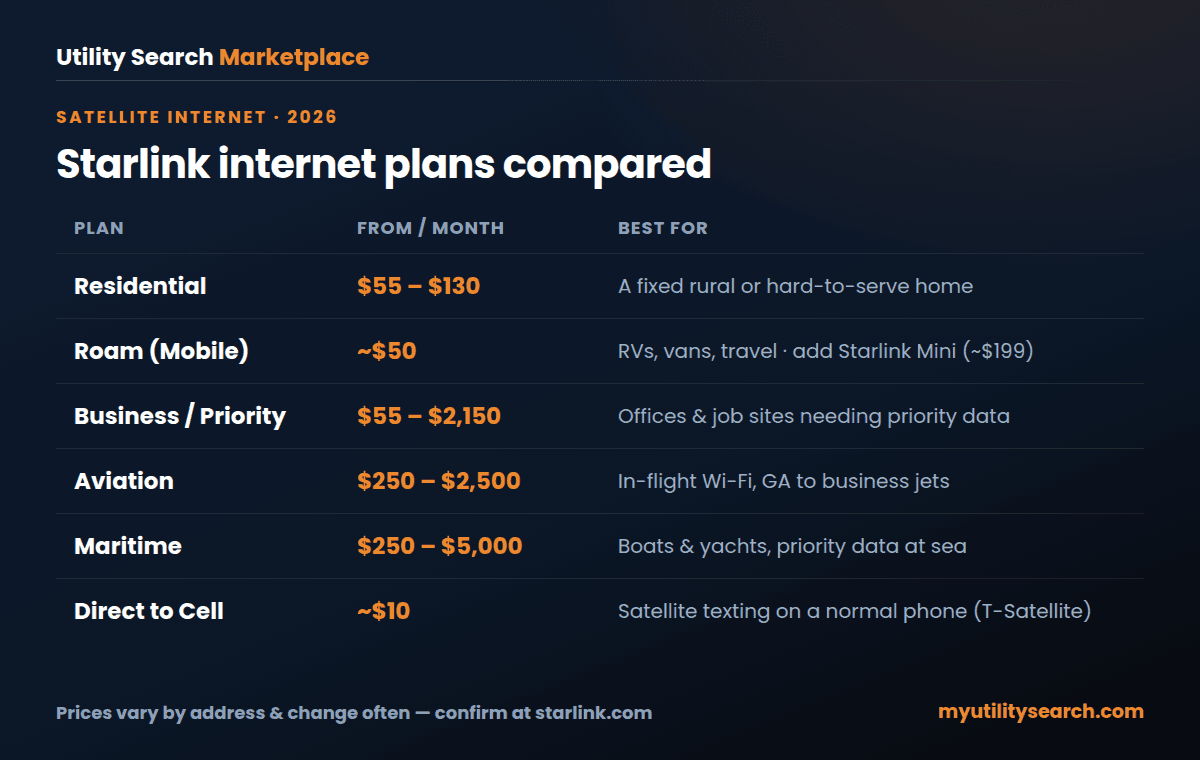
- Fixed rural home → Residential (100/200/Max)
- RV, van, or travel → Roam (+ Starlink Mini)
- Office or job site → Business / Priority
- Aircraft → Aviation
- Boat or yacht → Maritime
- Phone dead zones → Direct to Cell (T-Satellite)
Compare internet, energy & home security at your address
Shop InternetShop Energy RatesShop Home SecurityStarlink internet plans FAQ
The questions people ask most about Starlink internet plans, answered from the current rate card.
How does Starlink internet work? Starlink works by connecting a small self-aiming dish at your location to thousands of SpaceX satellites in low-Earth orbit, which relay your traffic to ground stations and the wider internet. Because the satellites are close to Earth, latency stays low (~25–60 ms).
How much is Starlink internet per month? Residential Starlink is about $55–$130/month depending on your speed tier, address, and congestion, plus a one-time ~$349 kit. Roam starts near $50/month; specialty plans (Business, Aviation, Maritime) cost more.
Is Starlink internet good? For rural and remote users, yes — Starlink is the strongest option where wired broadband doesn’t reach, with low latency and unlimited data. Where fiber or cable exists, those are usually faster and cheaper.
Is Starlink internet available in my area? Starlink is available across most of the U.S., with occasional short waitlists in high-demand regions. Check the Starlink map or enter your ZIP with us to compare it against any wired options at your address.
How do I install Starlink internet? It’s a self-install: mount the dish with a clear view of the sky, plug in the router, and let it auto-align through the app — usually online in 15–30 minutes with no technician.
Is Starlink internet good for gaming? Yes for most casual and competitive play — 25–60 ms latency is playable — though occasional spikes mean fiber is still preferable for ultra-competitive esports.
How fast is Starlink internet? Typically 80–320 Mbps download and 8–25 Mbps upload at 25–60 ms latency, depending on your tier and local demand.
Does Starlink internet work in bad weather? Generally yes, including rain and snow (the dish self-heats), though very heavy storms can briefly slow the signal. A clear sky view matters more than weather.
Who owns Starlink internet? Starlink is owned and operated by SpaceX, Elon Musk’s aerospace company.
How do I cancel Starlink internet? You can cancel or pause Starlink anytime from your account — there’s no contract and no early-termination fee, and Roam users can pause billing with Standby Mode.
How reliable is Starlink internet? Very reliable for a satellite service, with uptime that suits remote work and streaming; the most common disruptions come from sky obstructions (trees, roofs) rather than the network itself.
Bottom line on Starlink internet plans for 2026: Residential 200 at $85 is the value pick where it is offered, Residential MAX at $130 is the only tier that guarantees priority data in a congested cell, and Roam 100 GB at $55 with a $199 Mini is the cheapest way to try Starlink internet plans before committing a full household to satellite. Compare every provider at your address before you buy the dish.
How much does Starlink cost for an RV? Starlink Roam plans for RVs run $55, $80 and $175 a month depending on how much priority data you want and whether you need in-motion use. Most RV owners pair Roam with the $199 Starlink Mini instead of the $349 standard kit. See our best Starlink setup for RVs for the full breakdown.
What is the cheapest Starlink plan? Residential 100 at $55 a month is the cheapest home plan, and Roam starts at $55 for travel. In low-demand areas the $349 kit is often free on a rental promo, which makes the first-year cost about $660. Prices vary by address, so the checkout price can differ from the list price.
Does Starlink have data caps? No. Residential plans are unlimited with no overage fees. Residential 100 and 200 are deprioritized behind Residential MAX during congestion, so speeds can dip at peak hours. There is no contract, so you can cancel any month.
Sources
Every price and speed in this guide to Starlink internet plans can be checked against the primary source:
- Starlink — Residential plans and pricing — Residential 100/200/MAX tiers, kit price, rental promos (verified 6 September 2026).
- Starlink — Roam plans — Roam 100 GB, 300 GB and Unlimited pricing; Starlink Mini.
- Starlink — hardware specifications — standard kit, Mini and Performance dish specs.
- FCC National Broadband Map — check which fixed and satellite providers report service at your address.
- myutilitysearch.com — Amazon Leo pricing — the LEO competitor’s announced terminals, timeline and waitlist.
Keep going
- Best Starlink for RV — Roam plans, the Mini kit and in-motion rules
- Starlink vs T-Mobile Home Internet — satellite against 5G fixed wireless
- Starlink news and timeline 2026 — price changes, outages, IPO quarter, launches
- Amazon Leo pricing — what the LEO competitor has confirmed vs Starlink
- Satellite direct-to-device explained — the carriers-vs-Starlink phone fight
- Best internet for rural areas — what actually reaches unserved addresses
- HughesNet internet review — the geostationary alternative and its data caps
Compare internet, energy & home security at your address
Shop InternetShop Energy RatesShop Home SecurityBy Christopher Burg · Utility Search Marketplace · Last updated 6 September 2026. Prices vary by address and change often — confirm current Starlink internet plans and pricing at starlink.com before ordering.








2 thoughts on “Starlink Internet Plans & Prices 2026: Every Tier, Kit and Fee (vs Amazon Leo)”