Blog
Best Internet for Remote Work: The Most Reliable Providers


Updated on September 19, 2026
5 min read
The best internet for remote work is low-latency fiber — and it’s also the most reliable. Fiber delivers the three things remote work depends on — symmetrical upload, the lowest latency of any wired technology, and a dedicated (not shared) line — so video calls, VPNs, and cloud tools stay stable all day. Where fiber isn’t available, cable over a wired connection is the next-best; fixed wireless and satellite are usable backups but trail on latency and consistency.
TL;DR — key takeaways
- Reliability for remote work = uptime + low latency + symmetrical upload, not headline download speed.
- Fiber wins on all three. FCC testing measures fiber idle latency at 7–13 ms vs. cable’s 12–22 ms and DSL’s 22–36 ms.
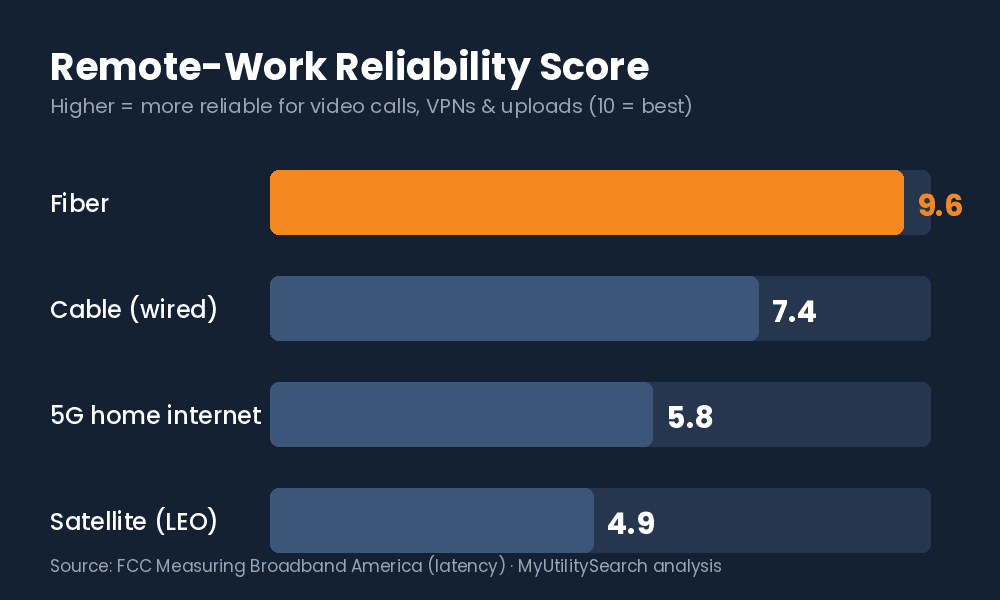
- Our Remote-Work Reliability Score: Fiber 9.6 · Cable 7.4 · 5G Home 5.8 · Satellite 4.9.
- Best providers: AT&T Fiber, T-Mobile Fiber, Verizon Fios, Frontier Fiber. Always confirm what’s wired to your address.
What makes internet “reliable” for remote work?
Reliability for remote work is a combination of three measurable things: uptime (how rarely it drops), latency (how little delay it adds), and upload consistency (whether your outgoing video and VPN traffic stay steady). A plan can advertise a huge download number and still fail a workday if it’s high-latency or its upload collapses when you’re on camera. That’s why the reliability question is different from the “fastest internet” question.
The Remote-Work Reliability Score
We scored each widely available connection type 1–10 on the three factors that decide a workday, weighting latency and upload consistency most heavily because those are what break calls and VPNs.
| Connection type | Uptime | Latency | Upload consistency | Reliability Score |
|---|---|---|---|---|
| Fiber | Excellent | Lowest (7–13 ms) | Symmetrical, steady | 9.6 — best |
| Cable (wired) | Good | Low (12–22 ms) | Asymmetric, dips under load | 7.4 |
| 5G home internet | Variable | Moderate, variable | Variable by signal | 5.8 |
| Satellite (LEO) | Weather-sensitive | Higher | Variable | 4.9 |
Latency figures are FCC-measured idle latency by technology (Measuring Broadband America). Scores are MyUtilitySearch’s weighting of uptime, latency, and upload consistency for remote-work use.
Is fiber or cable more reliable for working from home?
Fiber is more reliable than cable for working from home, for two structural reasons. First, fiber is a dedicated line — your performance doesn’t sag when the neighborhood gets busy — while cable is shared, so evening congestion can slow it. Second, fiber’s upload is symmetrical, so being on camera doesn’t compete with everything else you’re doing. Cable is a strong second when run over Ethernet, but its upload is a fraction of its download.
- The FCC measures fiber idle latency at 7–13 ms, the lowest of any fixed technology; cable runs 12–22 ms and DSL 22–36 ms (FCC, Measuring Broadband America).
- The FCC found cable and fiber providers delivered ≥100% of advertised speed to more than 80% of users, more than 80% of the time — DSL was materially less consistent.
- Independent 2026 reliability analyses report fiber networks sustaining 99.9%+ uptime and roughly 70% fewer outages than legacy copper lines.
How much uptime and speed do I actually need?
For reliable remote work, prioritize a wired connection and strong upload over a big download tier. A single HD video call needs only a few Mbps up, but real households stack calls, backups, and streaming — so aim for at least 10 Mbps upload, ideally symmetrical fiber at 300 Mbps–1 Gbps. The connection type and a wired link matter more to reliability than buying a higher speed on an unreliable line.
Key terms: Uptime — the share of time your connection is usable (99.9% ≈ under ~9 hours of downtime a year). Latency — the delay before data moves; low latency keeps calls responsive. Jitter — variation in latency; even 5–10 ms causes audible glitches. Symmetrical speed — equal upload and download, the defining trait of fiber.
Which providers offer the best internet for remote work?
| Provider | Type | Why it’s reliable for WFH | Best for |
|---|---|---|---|
| AT&T Fiber | Fiber | Symmetrical, low latency, strong uptime | Anyone with it at their address |
| T-Mobile Fiber | Fiber | Symmetrical fiber, simple pricing | Fiber homes wanting flat pricing |
| Verizon Fios | Fiber | Consistent low-latency performance | Northeast fiber footprint |
| Frontier Fiber | Fiber | Expanding symmetrical fiber | Newly-wired fiber areas |
| Xfinity / Spectrum | Cable | Best non-fiber option, wired | No fiber available yet |
| Starlink | Satellite (LEO) | Reliable where nothing wired exists | Rural / no-wired-option homes |
For most households, the best internet for remote work will be whichever fiber provider reaches the address. Availability is address-specific — confirm what’s actually wired to your home on the FCC National Broadband Map before you choose. For the full setup, see our guide to the best internet for working from home, our pick for the best internet for video conferencing, and whether Starlink is worth it for rural remote work.
Compare internet, energy & home security at your address
Frequently asked questions
What is the best internet for remote work?
The best internet for remote work is low-latency fiber. It combines the lowest latency of any wired technology (FCC-measured 7–13 ms), symmetrical upload, and a dedicated line, so calls and VPNs stay stable through a full workday.
Is fiber or cable more reliable for working from home?
Fiber. It’s a dedicated connection with symmetrical upload, so it doesn’t slow during neighborhood congestion and doesn’t struggle when you’re on camera. Cable is a solid second when used over a wired Ethernet connection.
How much uptime do I need to work from home?
Aim for a provider delivering 99.9%+ uptime — roughly under nine hours of downtime a year. Connection type matters more than the advertised speed tier; fiber sustains the highest uptime.
Is 5G home internet or satellite reliable enough for remote work?
They work as primary or backup where wired options are limited, but both have more variable latency and upload than fiber or cable. For rural addresses with no wired option, low-earth-orbit satellite like Starlink is the most reliable available choice.
Why does my internet drop during video calls even though it’s fast?
Usually high latency, jitter, or weak upload — not download speed. A wired connection on a low-latency fiber line fixes most call instability that a faster download tier cannot.
How to check if your internet is reliable enough for remote work
You can confirm whether your connection is ready for remote work in a few minutes:
- Run a speed test on a wired connection. Plug into the router and check your upload number first — aim for 10 Mbps or more for dependable video calls.
- Check latency and jitter. Most speed tests report ping (latency) and jitter; look for latency under about 50 ms and jitter under 10 ms so calls stay smooth.
- Test during a real video call. Join a Zoom or Teams meeting and share your screen — if it holds steady, your line can handle a remote-work day.
- Confirm what is available at your address. Use the FCC National Broadband Map to see whether fiber is an option before you switch providers.