Blog
Best Internet for Remote Work and Gaming

Updated on July 12, 2026
The best internet for remote work and gaming is low-latency fiber. Gaming rewards low ping and remote work rewards symmetrical upload, and fiber delivers both on one connection — so a 500 Mbps–1 Gbps fiber plan handles competitive games, streaming, and video meetings without contention. Where fiber is not available, wired cable is the next-best for the work half but adds latency for the game half.
TL;DR — key takeaways
- Gaming needs low latency (ping); remote work needs symmetrical upload — fiber is the only common connection that nails both.
- Aim for sub-20 ms ping and at least 10 Mbps upload; 500 Mbps–1 Gbps fiber covers games and calls at once.
- Always use a wired connection for the machines that game or take calls.
- Top picks: AT&T Fiber, T-Mobile Fiber, Verizon Fios, Frontier Fiber — availability by address.
Does gaming need different internet than remote work?
Yes and no. Both want a stable, low-latency line, but they stress different metrics. Games care most about ping and jitter — how fast and consistent the round-trip is — and barely touch bandwidth. Remote work cares most about upload for video and VPN. Fiber wins for both because it has the lowest latency of any home connection and symmetrical upload.
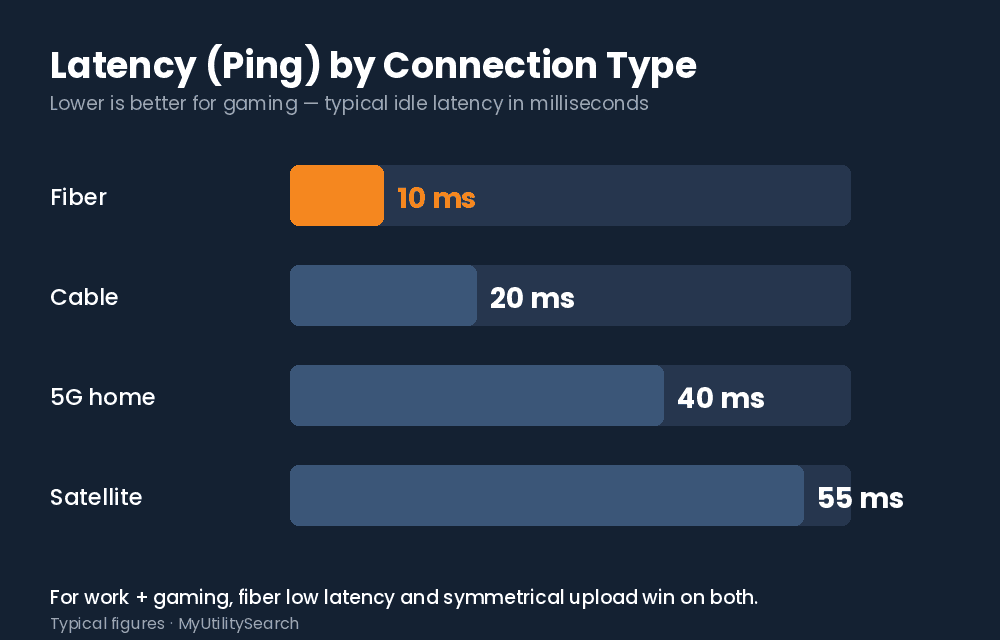
Stat block: The FCC measures fiber’s idle latency at 7–13 ms, versus 12–22 ms on cable and 22–36 ms on DSL — the lowest ping of any fixed technology (FCC, Measuring Broadband America). Competitive gaming feels best under ~20 ms, which fiber clears with room to spare.
What ping and speed do I need for gaming and work?
For gaming, target ping under 20 ms and minimal jitter; raw download barely matters (most games use under 100 Mbps even while updating). For remote work on the same line, add at least 10 Mbps upload for calls. A single 500 Mbps symmetrical fiber plan comfortably covers a gamer and a remote worker at the same time.
Key terms: Ping / latency — the round-trip delay; lower is better for games. Jitter — variation in ping; spikes cause rubber-banding. Symmetrical upload — equal up and down speed, what keeps your work calls clear while you game.
Best internet for remote work and gaming, by connection type
| Connection | Ping for gaming | Upload for work | Verdict |
|---|---|---|---|
| Fiber | Lowest (7–13 ms) | Symmetrical | Best for both |
| Cable (wired) | Low (12–22 ms) | Limited | Good work, okay gaming |
| 5G home | Variable | Variable | Backup only |
| Satellite (LEO) | Higher | Variable | Rural last resort |
Availability is address-specific — check the FCC National Broadband Map. See also our guides to the most reliable internet for remote work, the best internet for video conferencing, and the best fiber internet for working from home.
Wired vs. Wi-Fi for gaming and calls
Always wire the machines that game or take calls. Wi-Fi adds latency and jitter that ruin both competitive matches and video meetings. Run Ethernet to your PC or console and your work laptop; reserve Wi-Fi for phones and tablets. If wiring is not possible, use the 5 GHz band and sit close to the router.
Can one plan really handle work and gaming at once?
On fiber, yes — comfortably. Because games sip bandwidth while demanding low ping, and remote work leans on upload, the best internet for remote work and gaming is simply a connection that is low-latency and symmetrical at the same time. A 500 Mbps fiber line lets one person grind a ranked match while another runs back-to-back video calls, with neither noticing the other. On limited-upload cable this balance is harder, which is why serious work-and-play households lean fiber.
Is your plan keeping up?
If your results are lower than you’re paying for, you may have faster options at your address. Compare internet plans available where you live — fiber, cable, and 5G, side by side.
Frequently asked questions
What is the best internet for remote work and gaming?
The best internet for remote work and gaming is low-latency fiber. It delivers the sub-20 ms ping games want and the symmetrical upload work calls need, on a single connection.
What ping do I need for gaming?
Aim for under 20 ms with low jitter. Fiber’s 7–13 ms idle latency clears that easily, while cable is usable and satellite is usually too high for competitive play.
Can one internet plan handle work and gaming at the same time?
Yes. A 500 Mbps symmetrical fiber plan covers a gamer and a remote worker simultaneously, since games use little bandwidth and fiber’s upload keeps calls clear.
Is fiber better than cable for gaming and work calls?
Yes. Fiber has lower latency for gaming and symmetrical upload for calls. Cable works wired but its upload is limited and its ping is higher.
Does gaming slow down my work video calls?
Not on fiber. With symmetrical upload and low latency, games and calls coexist. On limited-upload cable, heavy game updates can compete with call quality.
How to set up one connection for work and gaming
- Get low-latency fiber if you can. Confirm availability on the FCC National Broadband Map.
- Pick 500 Mbps–1 Gbps symmetrical. Plenty for simultaneous gaming, streaming, and calls.
- Wire your PC/console and work laptop. Ethernet removes the Wi-Fi jitter that hurts both.
- Test ping and upload. Confirm sub-20 ms ping and 10+ Mbps upload before it matters.
Bottom line: the best internet for remote work and gaming
If you do both under one roof, the best internet for remote work and gaming is symmetrical fiber at 500 Mbps or more. It gives games the sub-20 ms ping they need and gives your work calls the upload they need, at the same time, without either side stealing from the other. That single-connection advantage is why fiber is the default recommendation for any work-and-gaming household in 2026.