Blog
Xfinity Internet Speed Tiers Explained

Updated on October 25, 2026
14 min read
Xfinity internet speed tiers come in four national residential levels: 300 Mbps, 500 Mbps, 1 Gig and 2 Gig. On a live Houston quote on October 1, 2026, the five-year price guarantee runs $45, $60, $70 and $100, one-year promos are $10 lower at $40, $50, $60 and $90 (both include the $10 autopay and paperless discount), against everyday prices of $80, $95, $110 and $140. Prices vary by address. For most households the deciding factor is not download speed — even the entry tier is far more than a typical home uses — it is upload speed and WiFi coverage.
Last updated: 1 October 2026. Verify pricing at your address — it is address-specific.
TL;DR — Xfinity internet speed tiers at a glance
- Four tiers: 300 Mbps / 500 Mbps / 1 Gig / 2 Gig.
- Everyday (standard) prices: $80 / $95 / $110 / $140 (Houston, October 2026). Promo pricing on the five-year lock is $45 / $60 / $70 / $100.
- All tiers include unlimited data, the WiFi gateway, one free Xfinity Mobile line for 12 months, and no annual contract.
- The advertised price assumes autopay from a bank account. Pay by credit card and it’s $5/month more; skip autopay entirely and it’s $10 more.
- Xfinity does not publish upload speeds on its plan pages. If you upload — video, backups, multi-person video calls — look at X-Class, which is symmetrical.
- The FCC’s long-term goal is 1 Gbps down and 500 Mbps up. No standard Xfinity tier meets the upload half.
Best for most households: 500 Mbps. It carries three to five people streaming, gaming and working from home without gig pricing. If 1 Gig is within about $5 of 500 Mbps at your address (it was $70 vs $60 on a Houston quote on October 1, 2026), take the gig. Homes that upload heavily, such as creators and multi-person remote work, should look for symmetrical speed: X-Class, or a standard tier in an upgraded market, where Nashville now shows 1 Gig up and down at the same $70. Promo prices and the top tier change by address, so
compare every plan at your address before you commit.What are the Xfinity internet speed tiers?
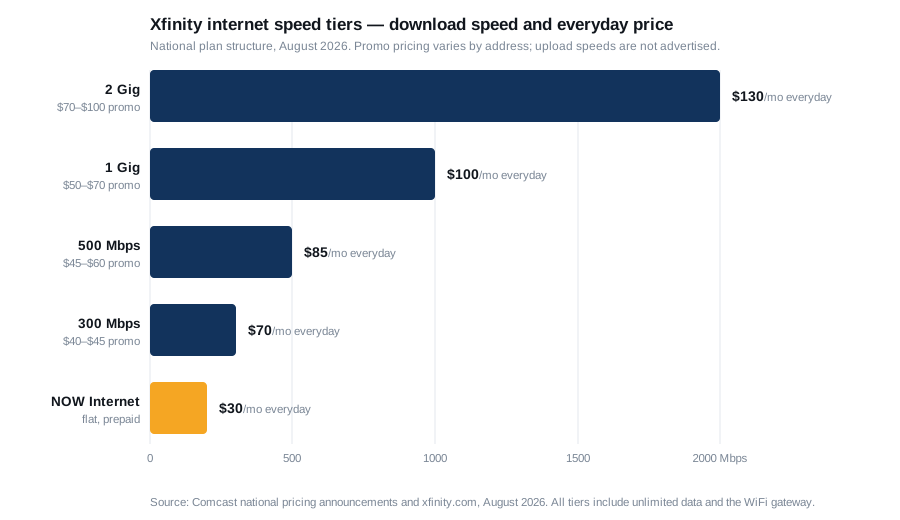
| Tier | Download | Upload | Promo (Oct 2026, Houston: 5-yr / 1-yr) | Everyday price | Xfinity’s own positioning |
|---|---|---|---|---|---|
| 300 Mbps | 300 Mbps | ~100 Mbps* | $45 / $40 | $80 | “For everyday use” |
| 500 Mbps | 500 Mbps | ~100 Mbps* | $60 / $50 | $95 | “Keep up on all your devices” |
| 1 Gig | 1,000 Mbps | ~150–300 Mbps* | $70 / $60 | $110 | “Made for busy households” |
| 2 Gig | 2,000 Mbps | ~200–500 Mbps* | $100 / $90 | $140 | Power users |
| NOW Internet (prepaid) | 100–200 Mbps | not published | $30 flat | $30 | No credit check, no contract |
Offer check, September 28, 2026: xfinity.com lists the 5-year price guarantee ladder at $45 (300 Mbps), $60 (500 Mbps) and $70 (1 Gig), new customers, Auto Pay from a bank account plus paperless billing required. Xfinity shows the offer ending October 25, 2026.
* Upload figures in this Xfinity internet speed tiers table are third-party estimates. Comcast does not advertise upload speeds on its consumer plan pages — a fact worth stating plainly, because it is the number that most often determines whether a plan feels fast.
Update, October 1, 2026: that is starting to change. At a Nashville address (37215), xfinity.com’s plan builder now lists the four standard tiers as symmetrical — 300/300, 500/500, 1 Gig/1 Gig and 2 Gig/2 Gig — at the same $45 / $60 / $70 / $100 five-year prices the Houston address we checked pays for cable-era uploads. The Houston address we checked (a street still on legacy coax) shows download only. Comcast upgrades node by node, so two streets in the same city can differ. If your address is in an upgraded market, you get X-Class-grade upload on a standard plan without paying for X-Class.
Why the promo column is a range: pricing across the Xfinity internet speed tiers is address-specific. On the same day in August 2026, Xfinity’s own site showed $40/$45/$50 at a default address while two independent trackers showed $45/$60/$70. Both are real. By October 1, 2026, a live Houston quote showed $45/$60/$70/$100 on the five-year lock and $40/$50/$60/$90 on a one-year term. The only price that matters is the one at your address.
Definition: promo price vs. everyday price
Since June 2025 Xfinity publishes both. The everyday price is the standard rate. The guarantee price is what you pay for one or five years, locked. The five-year guarantee has no annual contract and no cancellation penalty — it locks the rate without locking you in. Compare it with other providers in our internet price lock plans guide. What it does not lock is the Broadcast TV Fee and Regional Sports Fee, which sit outside promotional and minimum-term pricing and can rise while your “locked” rate stays flat. Those primarily affect TV and bundle customers, not internet-only.
How much internet speed do you actually need?
The FCC’s current broadband benchmark is 100 Mbps download and 20 Mbps upload, adopted 14 March 2024 — a fourfold increase over the 2015 standard of 25/3 (FCC). Its stated long-term goal is 1 Gbps down and 500 Mbps up.
The FCC’s household guide sets out tiers as Basic (3–8 Mbps), Medium (12–25) and Advanced (25+):
| Users or devices | Light use | Moderate use | High use |
|---|---|---|---|
| 1 user, 1 device | Basic | Basic | Medium |
| 2 users / devices | Basic | Medium | Medium–Advanced |
| 3 users / devices | Medium | Medium | Advanced |
| 4 users / devices | Medium | Advanced | Advanced |
- Light use — email, browsing, basic video, VoIP, internet radio
- Moderate use — light use plus one high-demand application: HD streaming, multiparty video conferencing, online gaming, or telecommuting
- High use — light use plus more than one high-demand application at the same time
The FCC’s own caveat is worth quoting: these are “rough guidelines and are not based on surveys or experiments.”
Here is the honest synthesis. By the FCC’s framework, a four-person high-use household needs “Advanced” — 25+ Mbps. Xfinity’s entry tier is 300 Mbps, twelve times that. Comcast rates the 300 Mbps plan for up to 100 connected devices.
So for the overwhelming majority of households, moving up the Xfinity internet speed tiers does not fix anything, because download speed was never the constraint. The two things that actually constrain your experience are upload speed and WiFi coverage inside your house. A $50 tier with a gateway in the right place beats a $130 tier with a gateway in a closet, every time.
Which of the Xfinity internet speed tiers fits your household?
| Household | Recommended tier | Why |
|---|---|---|
| Solo renter, light use | NOW Internet or 300 Mbps | Flat $30 prepaid, no credit check, no promo cliff — or 300 Mbps if you want the mobile line |
| 1–3 people, streaming and browsing | 300 Mbps | Comfortably handles multiple 4K streams plus work calls |
| 3–5 people, several 4K streams, gaming, work from home | 500 Mbps | The mainstream pick; headroom without paying gig prices |
| 5+ people, heavy simultaneous use, large downloads, many smart devices | 1 Gig | Xfinity’s own “busy households” positioning |
| Large-file creators, prosumer workloads | 2 Gig | Genuinely overkill for anyone else |
| Anyone who uploads heavily | X-Class | Symmetrical upload — see below. This is the real answer for creators, streamers and multi-person WFH |
X-Class — the tier that actually solves the upload problem
Comcast launched the world’s first DOCSIS 4.0 deployment under the X-Class Internet brand in October 2023, using the Full Duplex variant so upstream and downstream share the same spectrum block. The result is symmetrical speed.
By October 2026 those symmetrical speeds have begun showing up on the standard tiers in upgraded markets. A Nashville plan-builder quote on October 1, 2026 listed every tier as symmetrical at no premium over Houston’s prices. Check your own address before paying extra for an X-Class plan.
| X-Class tier | Download | Upload |
|---|---|---|
| X-300 | 300 Mbps | 300 Mbps |
| X-500 | 500 Mbps | 500 Mbps |
| X-Gig | 1,000 Mbps | 1,000 Mbps |
| X-2Gig | 2,000 Mbps | 2,000 Mbps |
All include unlimited data and free gateway rental; X-Gig and X-2Gig add a 4K streaming box and Peacock Premium. X-500 and above require an Xfinity-supplied gateway (XB8 or newer) — no bring-your-own-modem at those tiers.
Availability of the X-Class Xfinity internet speed tiers is limited to DOCSIS 4.0 markets. As of mid-2026 that included Atlanta, Philadelphia, Colorado Springs, Sacramento, Denver, Seattle, Augusta, Miami and Pittsburgh, reaching millions of homes and expanding. Check your address.
If you have ever had a video call freeze while someone else was uploading, or waited an hour for a cloud backup, X-Class is the tier that fixes it — and a lower X-Class tier will feel faster than a higher standard tier.
What else affects your bill?
Autopay is a penalty, not a discount — and the framing matters. Xfinity’s own five-year guarantee page states the price “requires paperless billing and automatic payments with stored bank account (or additional $10/mo charge applies).” Autopay from a credit card gets only $5. The advertised price already assumes you’re paying from a bank account.
Equipment. The WiFi gateway is included at $0 on the national plans. On legacy plans it rents at about $15/month. xFi Complete is $25/month and bundles the gateway, unlimited data, security features, a free gateway refresh every three years and coverage warranty. Bring-your-own-modem eliminates the rental — except on X-500 and above.
Data caps. Xfinity’s own page states “All Xfinity Internet plans now come with unlimited data,” and adds: “If you have an older plan, you may have a 1.2 TB data cap.” Where the cap still applies — legacy plans in the Central and Western divisions; the Northeast is unlimited by default — overage runs $10 per additional 50 GB, capped at $100/month, with an unlimited add-on at $30/month standalone or $25 inside xFi Complete.
Gateways. XB7 is WiFi 6. XB8 is WiFi 6E and is required for X-500 and above. XB10 is the first DOCSIS 4.0 gateway with WiFi 7, supporting up to 10 Gbps down and 6 Gbps up. There is no published mapping of which tier ships which gateway — in practice it depends on local inventory.
Installation. $100 professional, $0–$15 self-install — the same across all Xfinity internet speed tiers.
Xfinity internet speed tiers FAQ
What are Xfinity’s internet speed tiers?
Four residential tiers nationally: 300 Mbps, 500 Mbps, 1 Gig and 2 Gig, with everyday prices of $70, $85, $100 and $130. Promotional pricing under the five-year guarantee is currently well below those. A prepaid NOW Internet option offers 100–200 Mbps at a flat $30. Availability and pricing vary by address.
What are Xfinity’s upload speeds?
Comcast does not advertise upload speeds on its consumer plan pages. Third-party estimates put standard tiers roughly in the 100–300 Mbps range depending on tier and market. If upload matters to you, look at X-Class, which is symmetrical — the same speed up as down.
How many devices can a 300 Mbps Xfinity plan handle?
Comcast rates its 300 Mbps plan for up to 100 connected devices. For most households the practical limit is WiFi coverage, not the plan.
Does Xfinity still have a data cap?
Not on current plans — Xfinity states all its internet plans now come with unlimited data. Older legacy plans in the Central and Western divisions may still carry a 1.2 TB cap, with overage at $10 per 50 GB up to $100/month. Northeast markets are unlimited by default.
Is the Xfinity five-year price guarantee real?
Yes, and there is no annual contract or cancellation penalty. It locks your internet rate for five years. It does not lock the Broadcast TV Fee or Regional Sports Fee, which sit outside promotional pricing and mainly affect TV and bundle customers.
Which Xfinity tier is best for working from home?
For most remote workers, 300 or 500 Mbps is ample on download. The tier that actually improves video calls and cloud backups is X-Class, because upload is the constraint — and X-300 at symmetrical 300/300 will outperform a standard 1 Gig plan for that specific job.
That is the whole decision on Xfinity internet speed tiers: pick by upload and WiFi, not by the biggest download number — and check the price at your own address before you believe any of them.
Which Xfinity speed tier is best for a family of four? For a family of four, 500 Mbps is the sweet spot. It handles several 4K streams, video calls and gaming at the same time. Move to 1 Gig if you have many smart-home devices or large downloads, or if the gig tier is only a few dollars more at your address. Upload-heavy households should consider X-Class instead.
Does my address change which Xfinity speed tiers I can get? Yes. The 300, 500 and 1 Gig tiers are available nearly everywhere Xfinity serves, but the top tier is sold as 1.2 Gig in some markets and 2 Gig in upgraded ones, and X-Class symmetrical plans are limited to areas where the network has been upgraded. Promotional prices also vary by address, so the same tier can cost different amounts in two cities. Upload speed varies too: a Nashville quote on October 1, 2026 showed every standard tier symmetrical, while the Houston street we checked, still on legacy coax, lists download only.
Xfinity speed tiers: the questions people ask, answered
What people type when they are deciding between Xfinity speeds, in their own words, answered as of October 2026.
What are the Comcast (Xfinity) speed tiers, and what happened to Connect More, Fast and Superfast?
Xfinity simplified its lineup in 2025 to four tiers named by speed: 300 Mbps, 500 Mbps, 1 Gig and 2 Gig, plus the prepaid NOW Internet plans. The old names map roughly as follows: Connect (75 Mbps) and Connect More (200 to 300 Mbps) became 300 Mbps; Fast (400 Mbps) became 500 Mbps; Superfast (800 Mbps) and Gigabit (1,000 to 1,200 Mbps) became 1 Gig; Gigabit Extra and Gigabit x2 became 2 Gig. If your bill still shows a legacy name you are on a grandfathered plan, usually at a higher price than the equivalent new tier.
What is the upload speed on Xfinity 300 Mbps and 500 Mbps?
Both upload at about 100 Mbps in markets where Xfinity has finished its network upgrade, and 10 to 20 Mbps in markets where it has not. The upgrade has reached most large metros. Upload is the number that matters for video calls, cloud backup and posting video; 100 Mbps is plenty for a household, 10 to 20 Mbps is tight for two people on simultaneous calls. Ask Xfinity, or run a speed test on a neighbor’s connection, before you assume the higher figure.
Xfinity 300 Mbps vs 500 Mbps: which do I need?
300 Mbps handles one or two people streaming 4K, gaming and working from home with room to spare; 500 Mbps is for three or more heavy users or a home with dozens of connected devices. Uploads are the same on both, so the extra $10 to $15 a month buys download headroom only. Most two-person households that pick 500 would not notice the difference from 300.
Xfinity 1 Gig vs 2 Gig: is there a difference for gaming?
No meaningful one. Game downloads finish faster on 2 Gig, but latency, which is what you feel in play, is identical because both run on the same cable node; neither tier changes ping. 2 Gig also needs a 2.5 Gb Ethernet port and a Wi-Fi 6E or 7 router to show its speed at all. For a gaming household the better upgrade is wiring the console or PC by Ethernet, not the jump from 1 Gig to 2 Gig.
Is 1 Gig internet overkill? Am I paying too much for it with Xfinity?
For most homes, yes. A family of four streaming in 4K on three TVs while two people work from home uses well under 300 Mbps at peak. 1 Gig earns its price when several people download very large files at once, when you back up to the cloud constantly, or when the house has 50-plus smart devices. If none of that describes you, dropping from 1 Gig to 500 or 300 Mbps saves $15 to $30 a month with no change you will notice, and the address check above shows what the same money buys from other providers.
Why does Xfinity recommend the 1 Gig plan over 2 Gig?
Because 2 Gig is hard to use and expensive to support: almost no home devices can take a 2 Gbps feed, it requires specific gateway hardware, and the upload speed is only modestly higher than 1 Gig. Xfinity steers most shoppers to 1 Gig as the top of the range that a normal household can actually see, which is the honest recommendation. 2 Gig is there for the small group of creators and home-server users who have the wiring for it.
If I have 1 Gig and use a lot of data in one day, does my internet slow down for the rest of the month?
No. ‘Gig’ refers to speed (1,000 megabits per second), not a monthly data allowance. Xfinity does not throttle after heavy usage, and it has removed its 1.2 TB monthly data cap on the current plans in most markets, so there is no overage either. Your speed on day 30 is the same as on day 1; the only things that slow it are neighborhood congestion at peak hours and Wi-Fi conditions inside your home.
Do I need a new modem if I upgrade from 500 Mbps to 1 Gig?
Usually not if you rent the xFi Gateway, which supports every tier through 1 Gig and is swapped free if yours is an older model. If you own your modem, check it against Xfinity’s approved-device list: a DOCSIS 3.1 modem is required for 1 Gig and 2 Gig, and many DOCSIS 3.0 modems that worked at 500 Mbps will not deliver gig speed. 2 Gig requires Xfinity’s newest gateway or a specific short list of owned modems with a 2.5 Gb port.
Can I upgrade my speed tier in the middle of an Xfinity contract or price guarantee?
Yes. Moving up a tier does not end a one-, two- or five-year price guarantee; the new tier’s price simply replaces the old one for the remaining term, and the change is immediate online or in the app. Moving down is also allowed but can forfeit a promotional rate tied to the higher tier, so check what the lower tier would cost under your current promo before you switch.
Do I have to buy a phone line or mobile plan to get the Xfinity 2 Gig speed?
No. 2 Gig is sold as internet-only. What you may have seen is the bundle discount: adding an Xfinity Mobile line knocks $10 to $20 a month off any internet tier, including 2 Gig, and the five-year price guarantee is marketed alongside it. The mobile line is optional on every tier.
What is the lowest Xfinity internet speed, and what are the actual speeds like?
The lowest regular tier is 300 Mbps; below that, NOW Internet, Xfinity’s prepaid brand, sells 100 and 200 Mbps for $30 and $45 flat. Real-world speeds on a wired connection usually land at or slightly above the advertised number (Xfinity provisions tiers a little high), and over Wi-Fi you will see less, especially on older devices. The speed chart above lists what to expect wired, on Wi-Fi 6 and on an older Wi-Fi 5 device.
Also searched as: Xfinity speed levels, Comcast speed tiers, Xfinity internet speed chart, Xfinity mbps plans and Xfinity speed options. They all mean the Xfinity internet speed tiers covered here. For which tier is the best value this month, see our best Xfinity internet plans page.
Also compare energy, home security and home warranty at your address
Electricity plans in 14 deregulated states. Security and warranty nationwide.
Keep going
- Midco internet — a regional cable ladder with 20–50 Mbps uploads next to symmetrical fiber at the same price
- Best Xfinity internet plans — which plan to actually buy
- Xfinity internet review — the full provider picture
- Internet data caps and overage fees — how caps work across providers
- Best internet for working from home — upload-first recommendations
- Best internet for large households — sizing for 5+ people
- Best internet for streaming — what 4K actually needs