Blog
Best Internet for Video Conferencing & Zoom Calls


Updated on September 19, 2026
5 min read
The best internet for video conferencing is a wired fiber connection with strong, symmetrical upload speed and low latency. Fiber keeps your outgoing video as fast as your incoming feed — exactly what Zoom, Teams, and Google Meet lean on when you are the one on camera. Where fiber is not available, cable over an Ethernet cable is the next-best option.
TL;DR — key takeaways
- Upload speed and low latency matter more than raw download speed for video calls.
- A single HD call needs only ~2–4 Mbps upload — but real households run several at once, so aim for 10 Mbps upload minimum, ideally symmetrical fiber.
- Best pick: fiber (AT&T Fiber, T-Mobile Fiber, Verizon Fios, Frontier Fiber). Runner-up: cable, wired.
- Judge a plan by its upload number and whether it is symmetrical, not the headline download figure.
Why upload speed matters more than download for video calls
On a video call you are sending your camera, mic, and screen-share to everyone else in real time — that is upload. Most home plans are built download-heavy (great for streaming, weak for being on camera), which is why calls freeze even on a “fast” plan. Fiber is the fix because its upload matches its download: a symmetrical 300 Mbps fiber plan has 300 Mbps up, while a 300 Mbps cable plan often has only 10–20 Mbps up.
How much upload speed does each platform actually need?
Per-call requirements are modest — the catch is running several at once in one home. These are each platform’s own published figures for HD group video:
| Platform | Upload for HD group video | Source |
|---|---|---|
| Zoom | 2.6 Mbps (720p) → 3.8 Mbps (1080p) | Zoom system requirements |
| Microsoft Teams | ~2 Mbps per user; up to 4.0 Mbps for best performance | Microsoft Learn |
| Google Meet | 1.8 Mbps (HD) → 2.6 Mbps (1080p group) | Google Workspace |
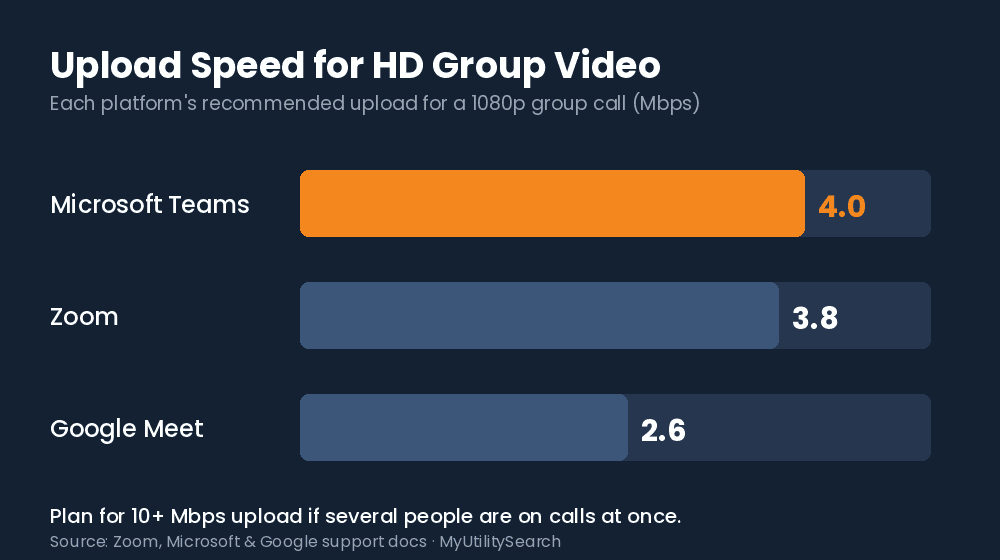
Stat block: Zoom recommends up to 3.8 Mbps upload for a full 1080p group meeting (Zoom). Microsoft Teams can use up to 4.0 Mbps upload for its best-quality experience (Microsoft). Google Meet requires a 3.2 Mbps outbound signal from each participant’s hardware (Google).
So what speed should I actually buy?
One HD call fits in ~4 Mbps upload, but a real household stacks calls, cloud backups, and streaming on the same line. A practical baseline widely recommended for reliable calling is at least 10 Mbps upload and 25 Mbps download over a wired connection. For a home with more than one person on camera at once, symmetrical fiber at 300 Mbps–1 Gbps removes the ceiling entirely.
Key terms: Upload speed — how fast your device sends data out (your video feed); the number that governs call quality. Symmetrical speed — equal upload and download, the hallmark of fiber. Latency / jitter — delay and its variation; even 5–10 ms of jitter causes audible glitches.
Which providers are best for video conferencing?
| Provider type | Example providers | Upload profile | Best for |
|---|---|---|---|
| Fiber (top pick) | AT&T Fiber, T-Mobile Fiber, Verizon Fios, Frontier Fiber | Symmetrical, low latency | Anyone regularly on camera |
| Cable (wired) | Xfinity, Spectrum, Cox | Fast download, limited upload | Occasional calls, no fiber |
| Fixed wireless / 5G | T-Mobile Home Internet, Verizon | Variable upload & latency | Backup / no wired option |
| Satellite | Starlink | Usable, higher latency | Rural addresses |
Availability is address-specific — confirm what is at your home on the FCC National Broadband Map before choosing. For the bigger picture, see our guide to the best internet for working from home and the most reliable internet for remote work.
Wired vs. Wi-Fi for video calls
For an important meeting, plug in. A short Ethernet run to the router eliminates the Wi-Fi interference, distance, and congestion behind most “you are breaking up” moments — even on an otherwise excellent plan. If wired is not possible, sit close to the router on the 5 GHz band and pause other heavy uploads during calls.
Compare internet, energy & home security at your address
Frequently asked questions
What is the best internet for video conferencing?
The best internet for video conferencing is low-latency fiber with symmetrical upload. It keeps your outgoing video as fast as your incoming feed, which is what Zoom, Teams, and Meet depend on when you are on camera.
How much upload speed do I need for Zoom?
Zoom needs up to 3.8 Mbps upload for a 1080p group call, but plan for 10 Mbps upload or more so simultaneous calls and background uploads do not degrade quality.
Is fiber or cable better for video calls?
Fiber, because its upload speed is symmetrical. A cable plan’s upload is often a fraction of its download, which is where calls struggle when you are presenting or on camera.
Do I need gigabit internet for video conferencing?
No — a single call needs only a few Mbps. Gigabit helps only when many people share the connection; the deciding factor is upload speed and a wired connection, not a gig headline.
Why does my video freeze on a fast internet plan?
Usually low upload speed or Wi-Fi jitter, not download speed. Switch to a wired connection and check your upload number — that is the metric video calls actually use.
How to set up your connection for reliable video calls
- Plug into the router with Ethernet. A wired link removes the Wi-Fi jitter behind most call drops.
- Check your upload speed. Run a speed test and confirm at least 10 Mbps up for multiple simultaneous calls.
- Close background uploads. Pause cloud backups and large file syncs during meetings.
- Confirm fiber availability. Check the FCC National Broadband Map to see whether symmetrical fiber is an option at your address.